Export filtered leads
Export filtered leads from Sales Navigator. Use a LinkedIn lead scraper to extract targeted prospects with your chosen filters and download relevant profiles in a structured CSV for B2B prospecting.

Run your search in Sales Navigator. Zilvo extracts up to 2,500 leads into a clean CSV, then checks every lead against your filters, so your team only works leads that actually fit.
Use Zilvo to collect the right records from Sales Navigator and review the data before using it in your workflow.
Export filtered leads from Sales Navigator. Use a LinkedIn lead scraper to extract targeted prospects with your chosen filters and download relevant profiles in a structured CSV for B2B prospecting.
Export filtered accounts from Sales Navigator. A LinkedIn data extractor helps collect company records into a CSV, making it easier to build targeted account lists for sales and market research.
Verify leads and accounts before producing output. Use your LinkedIn scraping tool’s verification results to review matches, mismatches and unverified records before using the exported data.
Scroll through the key fields available in lead and account exports. Exact fields depend on the data available in Sales Navigator.
Lead data (the person)
Account data (the company)
Follow these three steps to go from a filtered Sales Navigator search to a verified CSV.
Select leads or accounts and apply the criteria you need, such as role, location, industry or company size.
Use Zilvo to extract up to 2,500 records at once, then download the structured lead or account data as a CSV.
Review verification results so you can identify matches, mismatches and records that need a closer look.
1 lead = 1 credit, and no card required. Start with Zilvo.
Sales Navigator returns the leads its own search logic matches. Zilvo goes one step further and checks each extracted lead against the exact filters you set.
The rule is simple: one current employment must satisfy all of your applied filters together. A person can hold more than one current role, and Zilvo never combines attributes from different jobs into a false match.
Example: You search for VP Marketing at companies with 51–200 employees. A lead is VP Marketing at a 12-person startup and an advisor at a 120-person company. No single current role matches both filters, so Zilvo marks the lead as a Verified Mismatch.
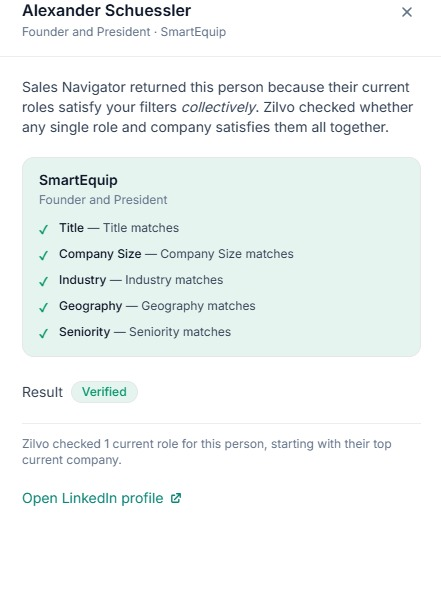 MATCH
At least one current employment satisfies all applied conditions together.
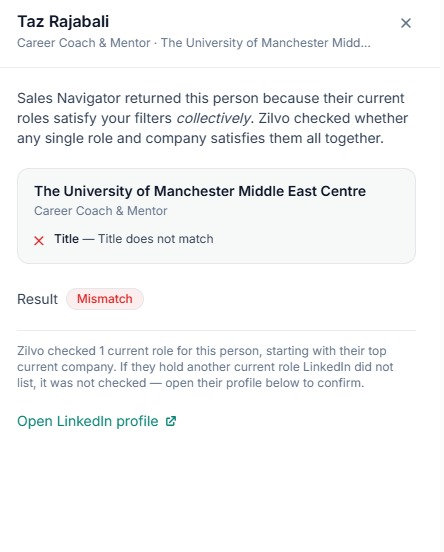 MISMATCH
Every current employment fails at least one required condition.
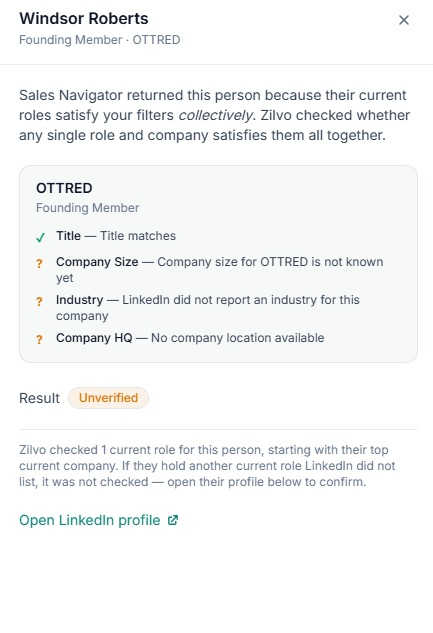 UNVERIFIED
The lead could match, but a required value cannot be verified reliably.
Verify fit before enrichment, so your team spends time on leads that meet your criteria.
Spend less time cleaning spreadsheets and more time acting on the right prospects. Zilvo brings extraction, filter-based verification and structured exports into one repeatable workflow.
Instead of treating every exported profile as a good fit, Zilvo helps your team review the data against the criteria that matter to your search—before the next step.
See Verified Match, Verified Mismatch or Unverified labels against your selected filters.
Export lead searches and account searches into structured CSV files.
Start with your Sales Navigator search and keep the filters you already use.
1 lead = 1 credit, with 500 free credits to get started.
Use the extraction workflow to prepare lists for the way your team already works.
For founders, SDR teams and marketers
Build the search, extract up to 2,500 leads, and keep the Verified Match rows only.
Outcome: A clean lead list your team can enrich or load into a sequence without cleaning the database.
For teams selling to target accounts
Export companies with an account search, then run a lead search for the right people inside them.
Outcome: An account list and a people list built from the same market.
For lead generation agencies and consultants
Run a separate search per client, extract, verify and deliver the CSV.
Outcome: Repeatable lists across campaigns, without assembling every spreadsheet by hand.
With a Sales Navigator subscription, create a lead or account search, apply your filters, then use Zilvo to extract and export the resulting records.
A Sales Navigator lead or account search using your chosen criteria.
A CSV file with extracted lead or company fields, ready to review and organize.
Verification results help you distinguish Verified Match, Verified Mismatch and Unverified leads before acting on them.
Zilvo uses simple credit pricing. You start with 500 free credits, and no card is required.
Try the workflow before committing.
Quick answers to common questions before you start extracting leads.
Build your search in Sales Navigator, apply the filters you need, choose how many leads to extract, review the verification labels, and export the results as a CSV.
Zilvo can extract up to 2,500 leads per run.
Verified Match means at least one current employment meets the complete filter set. Verified Mismatch means every current employment fails at least one required condition. Unverified means a required value cannot be verified reliably.
Zilvo uses credit pricing at 1 lead per credit. Start with 500 free credits, then check the pricing page for the available credit options.
Yes. Zilvo supports Sales Navigator lead searches and account searches, with structured CSV outputs for people and companies.
Depending on the information available, lead fields can include name, job title, seniority, location, current employer, time in role and LinkedIn profile URL. Account fields can include company name, industry, company size, headquarters, website, domain, description and specialties.
Yes. Agencies and consultants can run separate searches per client, verify results and deliver structured CSV lists.
Run your search, extract up to 2,500 leads per run, and check every row before it reaches your team.
Export Sales Navigator Leads →